Most people don’t struggle with ideas.
They struggle with execution.
They open a code editor, see files and errors they don’t understand, and quietly close the tab. That’s where vibe coding changes everything.
Instead of writing syntax, you describe what you want. The AI figures out the logic, structure, and implementation. You stay focused on the outcome, not the mechanics.
This guide explains what vibe coding is, how it works in practice, and the best vibe coding tools you can use today if you want to build apps without coding. If you’re a beginner, a non-developer, or someone exploring AI automation, this article will help you choose the right tool with clarity.
What Is Vibe Coding?
Vibe coding is a way of building software by communicating intent instead of writing code.
You don’t think in functions and frameworks.
You think in outcomes.
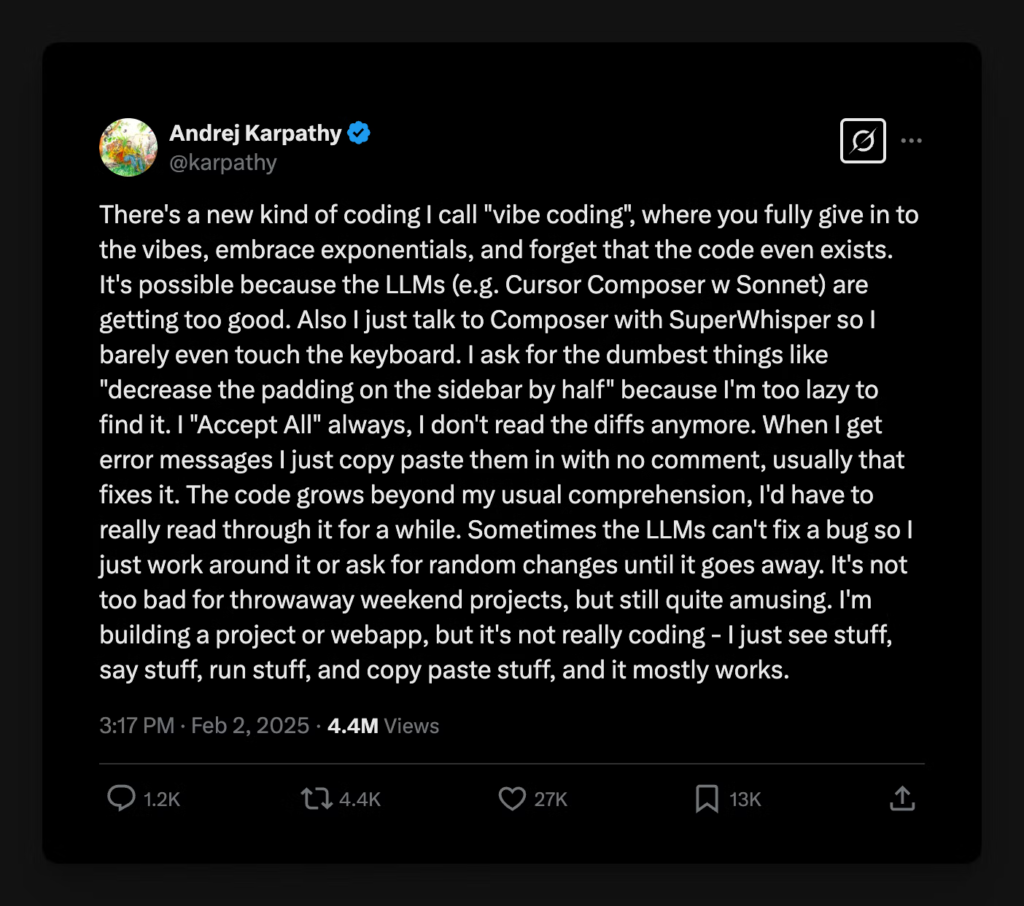
You say:
“I want a simple app where users can log in, submit information, and see a summary.”
The AI handles:
- Code generation
- Data handling
- Logic flow
- Fixing errors
- Iteration
That’s why vibe coding feels more like explaining an idea than programming. It’s not magic. It’s AI translating human language into working software.
Why Vibe Coding Is Gaining Momentum
Vibe coding exists because three things matured at the same time.
Large language models (LLMs) became capable of reasoning, not just text completion.
No-code and low-code platforms reduced infrastructure complexity.
Founders and creators started prioritizing speed over perfection.
The result is a new category of AI coding tools for non-developers that lets people ship real products in days instead of months.
This shift matters because most profitable apps are not technically complex. They are useful, focused, and fast to market.
Who Should Use Vibe Coding?
Vibe coding works best if you are:
- A non-technical founder
- A solo creator or indie hacker
- Someone testing SaaS or micro-tool ideas
- A marketer, analyst, or operator with workflows to automate
- Building MVPs, internal tools, or niche apps
It’s less suitable if you’re building performance-heavy systems or large-scale consumer platforms. For most early-stage ideas, vibe coding is more than enough.
Best Vibe Coding Tools You Can Use Today
Below are the most practical vibe coding tools available right now. Each one serves a slightly different type of builder. To make comparison easier, each tool includes a Vibe Score, based on how intuitive, fast, and code-free the experience feels.
Cursor (Vibe Score: 4/5)
Cursor
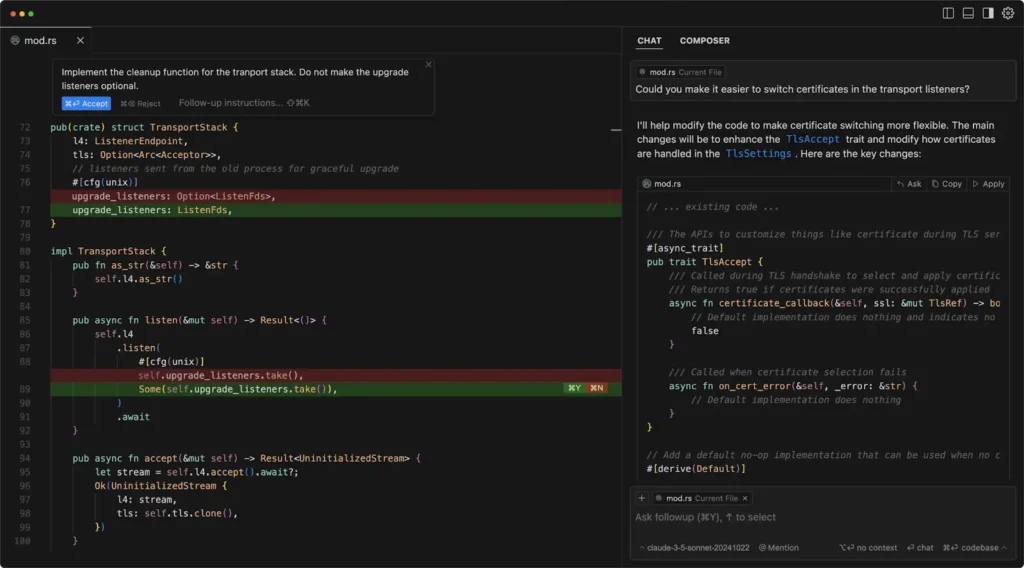
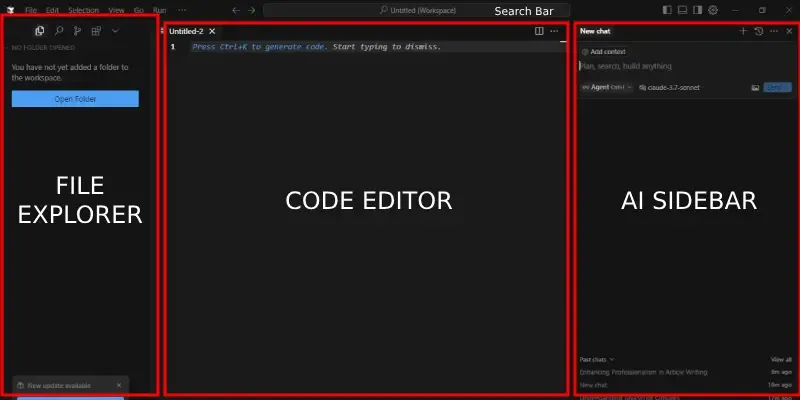
Cursor looks like a traditional code editor, but it behaves very differently.
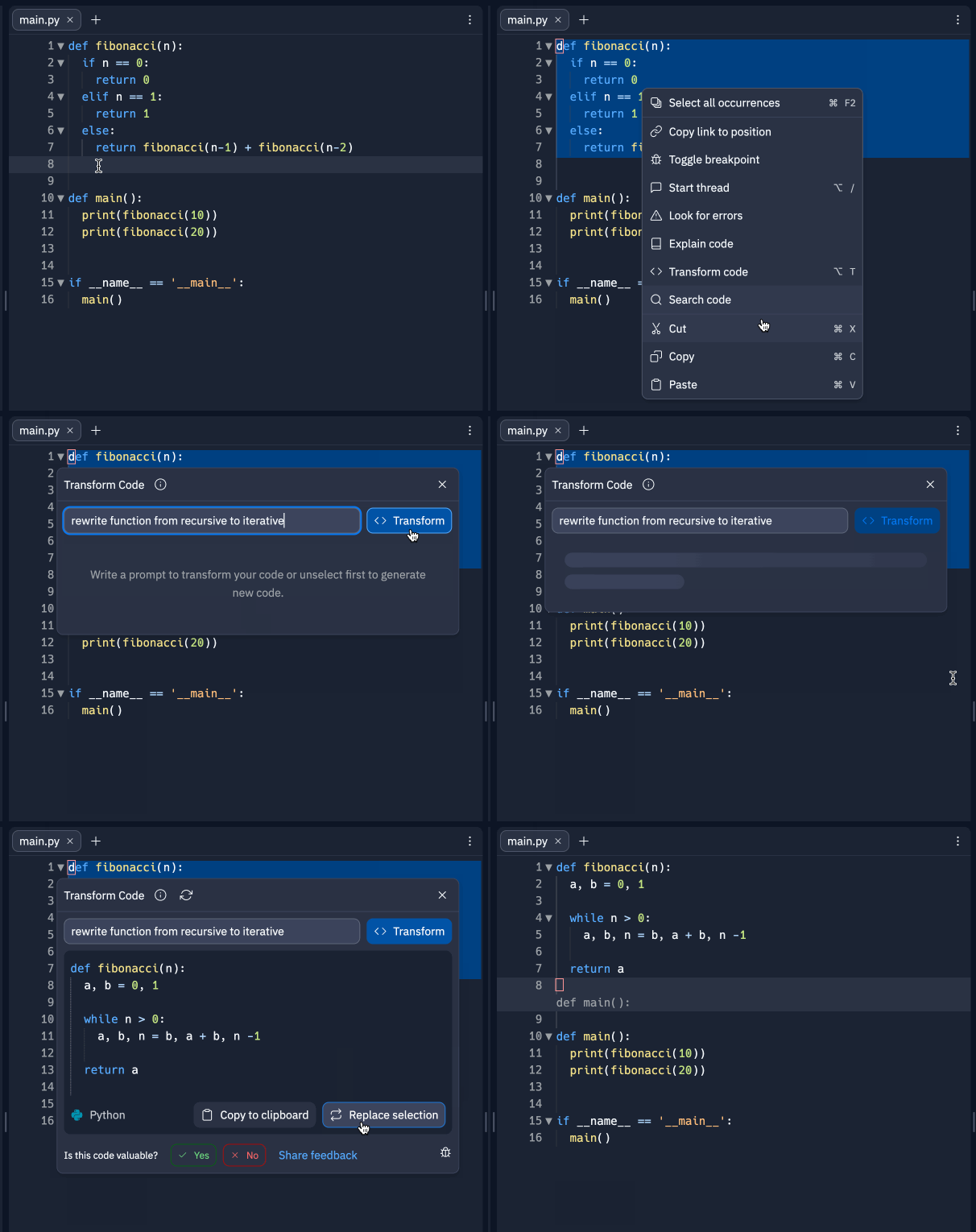
You can highlight code and tell Cursor what you want to change. You can ask it to explain files, refactor logic, or generate new functionality. It understands context across the entire project, which makes iteration fast.
Cursor is best described as vibe coding for developers or semi-technical builders. You still see code, but you rarely need to write it from scratch.
Best for:
- Developers who want to move faster
- Builders are comfortable reading code
- Refactoring or extending existing projects
Limitations:
- Not ideal if you want a fully no-code experience
- Requires a basic understanding of code structure
Cursor reduces friction, but it doesn’t eliminate code entirely.
Replit (Vibe Score: 5/5 )
Replit
Replit is one of the easiest ways to experience vibe coding for the first time.
You describe the app you want to build, and Replit:
- Creates the project
- Sets up the environment
- Writes the backend and frontend
- Deploys the app instantly
This makes Replit incredibly popular among beginners who want quick results without setup headaches.
Best for:
- Beginners building their first app
- Quick prototypes and demos
- Learning by experimentation
Limitations:
- Less control as projects grow
- Not optimized for production-scale systems
If your goal is to build apps without coding and see something live quickly, Replit delivers that experience better than most tools.
Vibe Score
Claude Code (Vibe Score: 4.5/5)
Claude
Claude Code is not a visual app builder. It’s a reasoning-first vibe coding tool.
Where Claude stands out is in:
- Breaking down complex logic
- Designing workflows
- Writing clean, structured code
- Explaining why something works or fails
Many builders use Claude Code alongside other tools. They design the system and logic in Claude, then implement it using platforms like Base44 or Replit.
Best for:
- Logic-heavy apps
- Automation workflows
- Builders who value clarity and reasoning
Limitations:
- No native deployment or UI
- Requires pairing with another platform
Claude Code feels like collaborating with a thoughtful engineer who explains their thinking.
Google AI Studio (Vibe Score: 3.5/5)
Google AI Studio
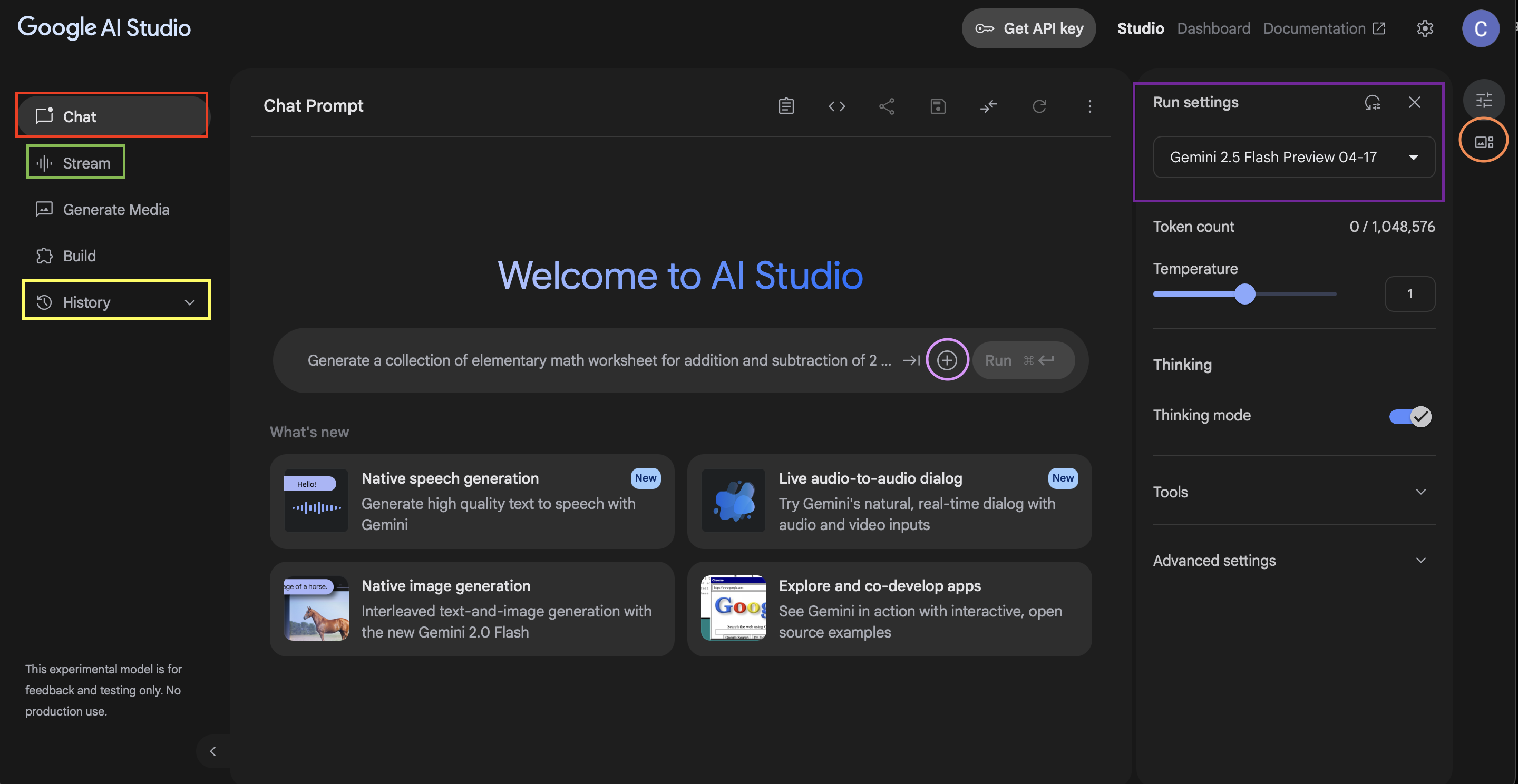
Google AI Studio is powerful, but it’s not an app builder in the traditional sense.
It shines when you want to:
- Experiment with prompts
- Build AI-powered workflows
- Prototype logic using Google models
- Understand how AI responses behave
It’s best viewed as a logic-and-experimentation environment, not a full-stack solution.
Best for:
- AI workflow testing
- Prompt engineering
- Backend intelligence
Limitations:
- No built-in UI or hosting
- Requires integration with other tools
Google AI Studio supports vibe coding thinking, but not full app creation on its own.
Lovable (Vibe Score: 4/5)
Lovable
Lovable focuses on the design-first side of vibe coding.
You describe your app, and Lovable generates:
- Clean user interfaces
- Well-structured flows
- Visually appealing layouts
It’s especially useful when presentation matters, and you want something polished without design skills.
Best for:
- Frontend-heavy apps
- Landing pages with logic
- User-facing tools
Limitations:
- Backend logic can feel constrained
- Less flexible for complex workflows
Lovable excels when you want your app to look good with minimal effort.
Base44 (Vibe Score: 5/5)
Base44 is where vibe coding becomes practical for business use.
You don’t manage servers.
You don’t write code.
You don’t stitch tools together.
You describe the app, define your data, and explain the rules. Base44 handles the rest.
This makes it particularly strong for:
- Internal tools
- Niche utilities
- Data-driven apps
- Monetizable micro-products
Best for:
- Non-developers
- Founders testing ideas
- Builders focused on usefulness over complexity
Limitations:
- Less customizable than full-code stacks
- Not meant for highly specialized engineering needs
If your goal is to turn ideas into usable software quickly, Base44 fits the vibe coding philosophy perfectly. I’ll share a detailed passive-income-focused use case for Base44 in a separate BoFU guide.
Vibe Coding vs Traditional Coding
Vibe coding is not about replacing developers. It’s about reducing friction.
Traditional coding is powerful, but slow and expensive. Vibe coding prioritizes speed, clarity, and iteration. For early-stage ideas, that trade-off often makes sense.
The biggest advantage is not technical. It’s psychological. When the barrier to building disappears, more ideas actually get tested.
Common Mistakes Beginners Make With Vibe Coding
Many people fail not because the tools are weak, but because expectations are wrong.
They try to build too much at once.
They don’t define the problem clearly.
They write vague prompts.
They expect perfection on the first attempt.
Vibe coding still requires thinking. The difference is that iteration becomes fast and forgiving.
Frequently Asked Questions
What is vibe coding in simple terms?
Vibe coding means building software by describing what you want instead of writing code. AI translates your intent into working applications.
Can non-developers really build apps using Vibe coding tools?
Yes. Many vibe coding tools are designed specifically for non-developers. You still need logical thinking, but not programming knowledge.
Are vibe coding tools good enough for real businesses?
For MVPs, internal tools, and niche apps, absolutely. Many profitable tools today start with vibe coding and evolve later if needed.
Conclusion
Vibe coding is not a trend. It’s a shift in how software gets built.
When you remove syntax, setup, and fear from the process, more people build. When more people build, better ideas surface faster.
Whether you choose Cursor, Replit, Claude Code, Google AI Studio, Lovable, or Base44 depends on your goal. If you want speed and simplicity, coding tools are the fastest way to turn ideas into reality.
If you’ve been waiting to build something but felt blocked by code, this is your signal to start.